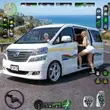
Urban Van Driving Simulator 3D APK puts you in control of passenger vans and minibuses within a detailed cityscape inspired by modern Dubai. This free Android driving simulator offers a blend of realistic 3D traffic, functional traffic signals, and Euro-style routes combined with mission-based gameplay that challenges your time management and driving skills. Players complete passenger pick-up and drop-off tasks, navigate busy terminals, and follow metro-city routes while driving minivans, school buses, and larger vans. Urban Van Driving Simulator 3D is perfect for fans of city transport simulators seeking a mix of relaxed exploration and strategic route planning.
Key Features
⭐ Realistic urban environment featuring traffic, signals, and intricate city roads.
⭐ Passenger pick-up and drop-off missions that test your timing and route knowledge.
⭐ Variety of vehicles including minivans, minibuses, and school transport.
⭐ Route and schedule management add strategic depth to the gameplay.
Advantages
✅ Free-to-play game focused on everyday city driving and passenger transport tasks.
✅ Smooth and easy-to-learn controls, suitable for both casual and simulation players.
✅ Combination of driving and light management mechanics keeps missions engaging.
✅ Modern 3D visuals and traffic systems create an immersive city commute experience.
Disadvantages
❎ Emphasis on urban routes and passenger missions means it’s not a high-speed racing game.
❎ Similar pick-and-drop missions may feel repetitive for players wanting more variety.
How to Download and Install Urban Van Driving Simulator 3D (via apkhubs.com)
- Open your mobile browser and go to apkhubs.com.
- Use the search bar to find Urban Van Driving Simulator 3D.
- Select the game from the search results and tap on the download button to get the APK file.
- Before installing, ensure that your device allows installations from unknown sources (usually found in Settings > Security).
- Locate the downloaded APK file on your device and tap it to begin installation.
- Follow the on-screen instructions to complete the installation.
- Once installed, open the game and enjoy driving in the detailed urban environment.